

There are always questions
Let's look at the most common questions that people have when looking at any Network Monitoring solution and see if we can't identify the key issues and solutions.
Goals and problem-fit
Companies start by asking whether they even have a clear network performance goal, and whether troubleshooting network issues is currently a pain point worth solving. Closely related is a security question: can the tool flag anomalies — unusual traffic patterns, rogue devices, CVE related issues — that might identify a risk, signal an attack and not just performance dips.
From experience in the Cybersecurity industry, I agree that unusual traffic patterns are useful in identifying potential attacks that are under way, but by then it is too late unless you have a cybersecurity team that can help mitigate the damage. Rogue devices on the network is something that you really need to know about immediately.
Finally for this question, CVE related issues will help you identify vulnerabilities and help you plug security gaps on your devices in the real world. This is always a great win. A classic example is after a .NET update to a new version. You would think that Microsoft would remove the old version, but no, it sits on your device with all of the lovely vulnerabilities the newer version fixed still open to abuse!
Scope of monitoring
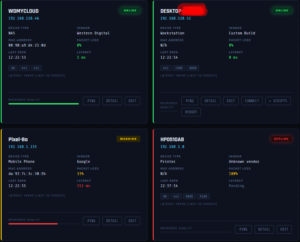
What exactly needs watching — which devices, interfaces, applications, and likely bottleneck points — and how many devices/interfaces the platform can handle as the network grows. Whether it copes with hybrid or on-prem/cloud mixes also comes up often.
In reality, if you are using a hybrid on-prem/cloud solution for anything you need to make sure that the cloud contracted provider is responsible for that side of the network. If they are not, then your data is probably not safe.
We are pretty clear that Netmon looks at anything on the LAN that it can discover. More than one LAN means more than one agent, but again if it can be discovered, then you get reporting on it.
Deployment and usability
How complex is setup, how much training does the team need, and how intuitive is day-to-day navigation. Companies also ask how well a new tool integrates with what they already run, and whether custom workarounds will be needed.
Netmon is simple to install, requires very little configuration and you only have to install the main agent on one Windows or Linux device on your LAN. If you need remote access to a computer, then you will need to install the RMM agent, but that is included in the cost and is integrated with the main system.
Everything works from a simple easy to use interface and telephone support is available, as is full documentation (it's on the website and in the application).
Alerting and insight quality
Do alerts actually say what, where, and when — tiered, timed, and actionable — rather than just raw threshold noise.
I have personally worked very hard on alerts and noise. The result is a very neatly tiered and timed system. The information you receive is precise and useful if I say so myself.
Access and reliability
Can the team monitor remotely from anywhere via a web interface, what uptime guarantee the vendor offers, and how transparent they are about data accuracy.
The web interface means if you have internet access you can monitor your networks. The uptime is 99.9% monthly uptime availability guarantee.
Data accuracy is 99.9%, we can't guarantee 100% because it's network monitoring, if any network monitoring system offers a 100% guarantee of accuracy they are fibbing.

Scalability and cost
Will the solution grow with the network without a re-platform, and does pricing scale sensibly with that growth rather than jumping in big steps. Companies weigh which features are essential versus nice-to-have against the price.
The pricing could not be more fair. Start-ups can get up to 5 LANs monitored for £29 per LAN per month (Pro) and at the moment the introductory offer allows you to have unlimited LANS and organisations monitored for £79 per month (MSP). That price for MSP will go up but anyone on the introductory price will get entered into a draw when the price increases and could keep that price for life!
Vendor support
Reputation for responsive support and how quickly the vendor helps resolve a critical incident rounds out the list — since a monitoring tool that's down or unsupported during an outage defeats the purpose.
Currently, you get direct access to the developer (me), during UK office hours. You will have email and telephone support on Pro and MSP plans.
Summary
If you are looking for Network Monitoring with the type of information and support that the big boys offer, you need to book yourself a demo, and in 30 - 40 minutes you will be able to make an informed decision.