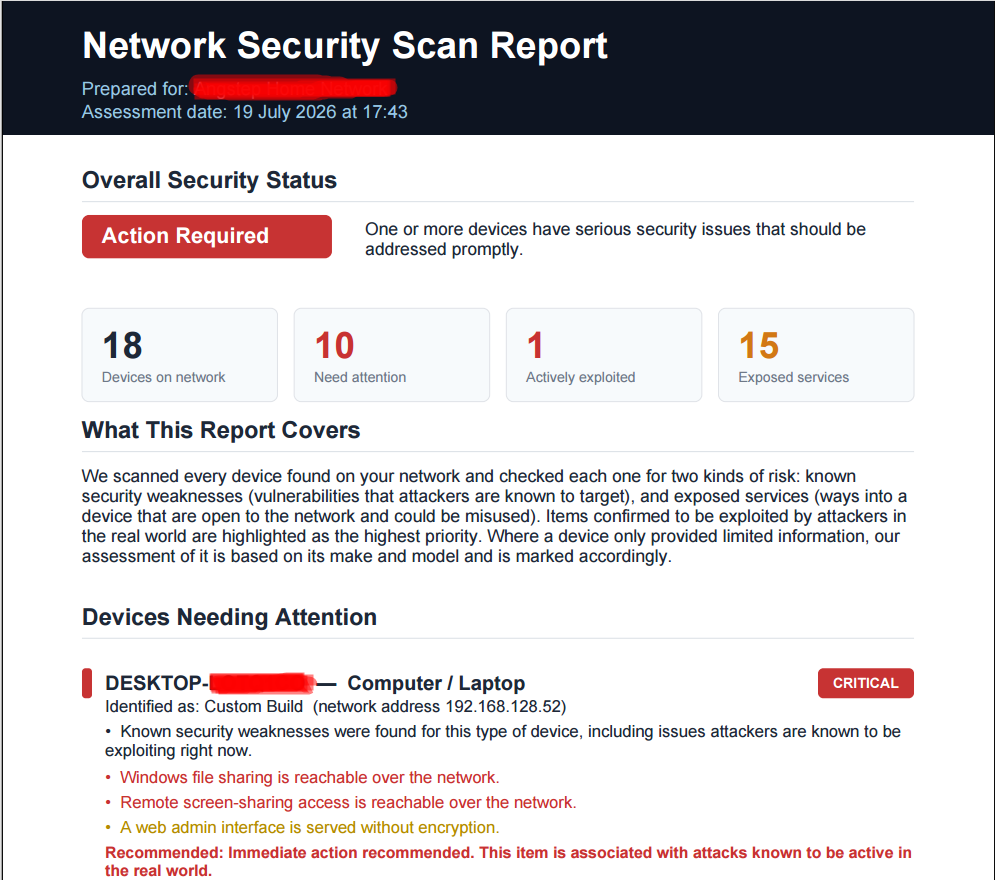

The Report Your Clients Actually Read
Quick answer:
Most output from generic IT reporting for clients fails because it's written for technicians, not for the client paying the invoice — dense with jargon, structured around device logs instead of business outcomes, and skimmed for the total before being filed away. Netmon reporting, a genuine MSP client reporting software capability built into the core platform, generates branded security reports and plain-English reporting in one click, built around the questions clients actually ask: was I protected, what happened, and what do I need to decide. Done well, this is one of the most underrated levers for MSP client retention available.
Pull up the last monthly report your MSP sent a client and read it the way the client actually read it: quickly, once, probably on a phone, between two other things.
What did they see? If it's like most reports in this industry, they saw a cover page with a logo, three or four pages of device uptime percentages, a table of ticket counts, and maybe a vulnerability count buried somewhere in the middle. They skimmed it for anything alarming, found nothing obviously on fire, and closed the file. Nothing in that report told them what their money bought them this month, in language a non-technical business owner would actually absorb. It told them what your monitoring tool measured. Those are not the same document.
This is the quiet failure mode of managed services reporting: the report exists, it goes out on schedule, it technically satisfies the contractual obligation to communicate — and it does almost nothing to reinforce, in the client's mind, why they're paying you every month. A report that isn't read might as well not have been written, and a report that's read but not understood does even less work than that, because it burns a moment of the client's attention on something that left them no more confident in the relationship than before they opened it.
The gap between "data" and "a story"
Here's the distinction that matters: a device uptime percentage is data. "Your network was available to your team 99.7% of the time this month, and the two brief outages were both resolved before your staff noticed them" is a story. Both statements can describe the exact same underlying facts. Only one of them means anything to a business owner who has never heard of packet loss and never will.
Most reporting tools generate the first kind of document by default, because it's easier to build a report generator that dumps monitoring data into a template than one that translates monitoring data into a narrative a non-technical reader can act on. The dumping approach isn't wrong, exactly — the numbers are accurate — but it hands the translation work back to you, the MSP, every single reporting cycle, for every single client, unless the platform you're using was actually built to do that translation for you.
Netmon's reporting is built around the second approach. Reports are generated in one click, branded with your MSP's own logo and colours rather than a monitoring vendor's, and structured around plain-English summaries rather than raw device logs — a security posture summary, a record of what was found and fixed, and a clear statement of what, if anything, needs the client's attention or sign-off. The underlying data is the same rigorous monitoring data any technical reader could verify. The presentation is built for the reader who's actually going to open the file.
Why "branded" is not a cosmetic detail
It's worth pausing on the branding point specifically, because it gets dismissed as a vanity feature more often than it should. A report that arrives with your monitoring vendor's logo on the cover page is quietly telling your client something you don't want them to notice: that the relationship they have isn't really with you, it's with a piece of software your company happens to operate. That's a fragile position to be in, especially at renewal time, when a client comparing MSPs is essentially comparing "who operates this software for me" rather than evaluating a genuine, differentiated relationship.
A report branded as yours — your logo, your language, your summary at the top explaining what mattered this month — does the opposite. It reinforces, every single reporting cycle, that the relationship is with your business specifically, built on judgment and service your client can't simply swap out for a competitor running the same underlying tool. Over a multi-year client relationship, that reinforcement, delivered monthly or quarterly without fail, is a meaningfully durable form of client retention — the kind that doesn't show up as a line item anywhere but shows up very clearly in your renewal rate.
## What clients are actually trying to learn
Strip away the jargon and every client reading an MSP report is trying to answer three questions, in roughly this order: was I safe, did anything happen, and is there anything I need to do. A report structured around device metrics buries all three of those answers inside data the client has to interpret themselves. A report structured around the questions answers them directly.
**Was I safe** is answered by a security posture summary — a plain statement of the vulnerabilities found, how many were addressed, and how the current state compares to the prior period. This is where vulnerability scanning data, translated out of CVE identifiers and CVSS scores into "we found and fixed twelve issues this month, none of which were actively being exploited elsewhere," earns its place at the very top of the document rather than buried in an appendix.
**Did anything happen** is answered by an incident summary that reads like a short account rather than a ticket log — what was detected, when, how quickly it was resolved, and whether the client's business was ever actually affected. This is also where automated remediation, if you're using it, becomes a genuine selling point rather than an invisible background process: "three potential issues were resolved automatically before they affected your team" is a sentence that does real work in a renewal conversation.
**Is there anything I need to do** is answered by a risk acknowledgement section — a documented record of any risk the client has been informed of and has chosen to accept, formally, with a clear audit trail. This section deserves particular attention, because it does double duty: it keeps the client genuinely informed about decisions that are theirs to make, and it protects your MSP with a documented record showing exactly what was flagged, when, and what the client decided to do about it.
The retention math nobody runs
Ask most MSP owners why a client left, and "the reporting was bad" is rarely the stated reason. Clients tend to leave citing price, or a specific bad experience, or simply drifting toward a competitor who made a more compelling pitch. But dig one layer deeper into most churn stories and a pattern emerges: the client who leaves is very often a client who couldn't articulate what they were getting for their money, because nothing in their regular experience of the relationship — including the reports — ever made that value legible to them.
Contrast that with a client who can say, in their own words, "our MSP caught and fixed a dozen vulnerabilities last quarter before they became a problem, and I get a report every month that actually tells me that in plain English." That client isn't vulnerable to a competitor's pitch in the same way, because the value of the current relationship is already visible and already understood, not something a competing salesperson gets to define first with a compelling story of their own.
This is the retention math that reporting quietly runs, whether or not anyone's tracking it: every report is either an opportunity to make your value legible, or a missed one. Multiply that across every client, every reporting cycle, over the life of a contract, and reporting quality stops being a nice-to-have and starts being one of the more underrated levers an MSP has over its own churn rate.
Reporting as a sales tool, not just a retention tool
There's an adjacent use for the same reporting capability that's easy to overlook: prospecting. A clean, branded, plain-English sample report — anonymised, built from a real audit of a prospective client's network — is a far more persuasive sales artifact than a slide deck of generic claims about "proactive monitoring." It shows a prospect exactly what they'd receive as a client, in the actual format they'd receive it, built from their own real network data rather than a generic template.
MSPs that use their reporting tool this way during the sales process report that it shortens the trust-building phase of a pitch considerably, because a prospect looking at a concrete example of "here's what you'd actually get" is evaluating something real rather than taking a salesperson's word for a promise.
Common mistakes that quietly undo good reporting
Even MSPs who know reporting matters tend to fall into a handful of avoidable traps that undo the value of an otherwise solid report.
Reporting on everything instead of what matters. There's a temptation, once a monitoring platform can measure dozens of things, to include all of them. A twelve-page report with every metric the platform tracks is not more thorough than a two-page report with the three that matter — it's just less likely to be read past the first page. Discipline about what to leave out is as important as accuracy about what to include.
Sending reports at the wrong cadence for the audience. A technical stakeholder inside a client's business might genuinely want monthly detail. The business owner who signs the contract usually wants a quarterly summary with the monthly detail available if they go looking for it, not delivered by default. Matching report frequency and depth to who's actually going to read it, rather than sending the same document to everyone on the distribution list, meaningfully improves how much of it actually gets absorbed.
Treating the report as a one-way broadcast The best use of a well-built report isn't just sending it — it's using it as the spine of a short quarterly business review conversation, where you walk a client through the highlights in five minutes rather than assuming they'll extract the same insight unprompted from a PDF. A report that's discussed, even briefly, lands differently than one that's simply delivered into an inbox.
Letting risk acknowledgements go stale. A documented risk a client accepted eighteen months ago, under circumstances that may no longer apply, shouldn't sit unreviewed in a report indefinitely. Revisiting older acknowledgements periodically — has anything changed, does the client still accept this risk knowingly — keeps the audit trail meaningful rather than becoming a historical artifact nobody revisits.
How reporting frequency changes the story you're telling
There's a strategic decision hiding inside something as ordinary-seeming as "how often do we send reports," and it's worth making deliberately rather than by default. Monthly reports tell a story of ongoing, granular diligence — useful for clients who want to feel closely looked after, and useful for MSPs who want frequent, low-stakes touchpoints to reinforce value regularly. Quarterly reports tell a different story, one better suited to summarising trends and demonstrating pattern-level improvement — fewer vulnerabilities found quarter over quarter, incident response times trending down, uptime holding steady across a longer window where short-term noise smooths out.
Neither cadence is universally correct. A client with a security-conscious board or a compliance obligation may specifically want monthly evidence they can point to. A client who explicitly told you they find frequent reports overwhelming is better served by a well-built quarterly summary than by monthly emails they've quietly started ignoring. The mistake isn't picking one cadence over the other — it's picking a cadence once, years ago, and never revisiting whether it still matches what a given client actually wants from the relationship.
What to change if your current reports aren't landing
If you suspect your own reporting isn't doing the retention work it should, the fastest diagnostic is blunt but effective: hand a recent report to someone outside your technical team — a partner, a friend who runs a small business, anyone without an IT background — and watch how long they spend on it before their eyes glaze over. If it's under thirty seconds, the report is failing at the one job it actually has, regardless of how accurate the underlying data is.
The fix isn't more data. It's less jargon, a plain-English summary at the top instead of buried at the bottom, and your own brand on the cover instead of a vendor's. Those changes cost nothing to make once your monitoring platform generates reports built that way by default, which is the entire reason report design deserves as much attention when choosing a monitoring platform as the monitoring itself.
FAQ: Client reporting for MSPs
Yes. Reports are generated with your own branding, not Netmon's or Angstep's, so the document your client receives reinforces your relationship with them directly.
Reports are generated in one click from live monitoring data, without manual compilation across multiple tools or spreadsheets.
Reports are structured around plain-English summaries — security posture, incidents, and risk acknowledgements — rather than raw device logs, so non-technical clients can understand what happened without needing you to translate it for them separately.