

We all started somewhere
It was 2006 when I left the corporate world and started my own MSP business in North Wales. Most companies that I talked to in the area had no idea what an MSP was, they didn't understand the role of a Managed Service Provider and how much time and effort using one would save them.
Using all the skills from the corporate IT world I soon found companies that would "have a go" and they never really looked back, until I made a mistake!! I got so busy that my monthly drop in's for coffee and a chat became 2 monthly, then quarterly.
Suddenly, not having any IT problems made it seem I wasn't doing anything, that "what are we paying you for" question would pop up and it was hard to demonstrate the power of remote working and fixing things using scripts.
The fault tickets were my only way of demonstrating my worth and because it was technical and often I would just use shorthand to close the ticket, it became a real probelm.
When I created Netmon, it was to take the very best parts of the myriad of tools I used daily as an MSP and then an MSSP and put them together in a way that most companies have never even tried.
The next thing I had to do was make it cost effective, I know how much tools cost, I've paid a fortune for tools only to find they were too expensive and far to complicated for day to day use.
Next I wanted a simple report automatically generated that was in English not Geek.
That's Netmon!
Network Quality
One of the things that can really affect your ability to support a client that phrase we all hate..... My computer is running slow, or the Internet is slow. We all know that 99 times out of 100 it is all down to too many applications or tabs open, but sometimes, it is a network issue.
That one time out of 100 when the computers network card (NIC) is on the way out, or the CAT5 cable it old and dodgy, or sometimes just not pushed all the way in.
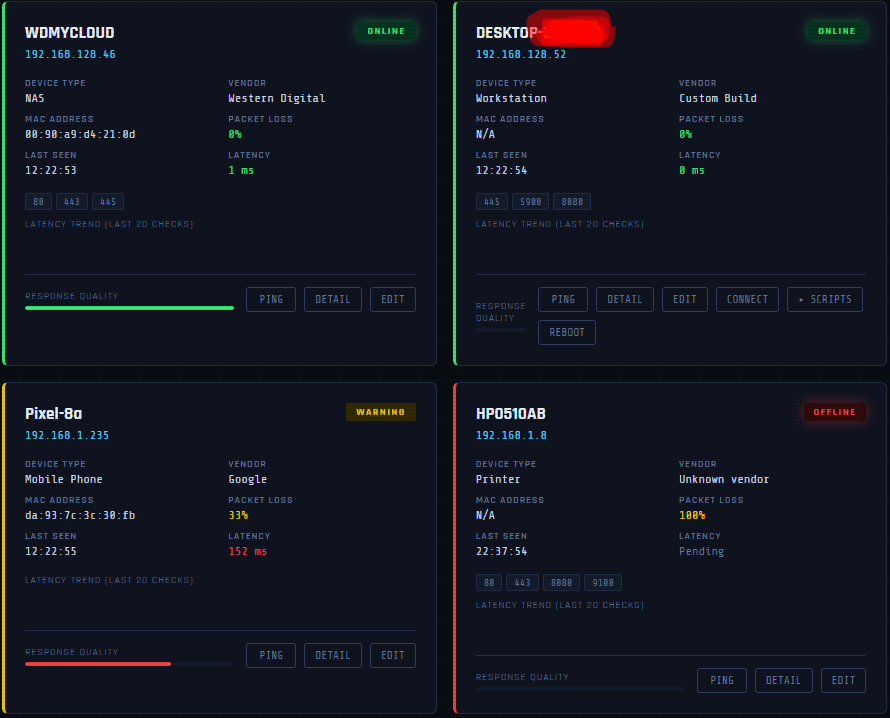
Netmon shows you the ping rate and latency visually on the device card, in the image below you can see 4 device cards, left to right, top to bottom they are a NAS drive, a PC, a mobile phone and an Offline Printer. Notice how the mobile phone (Pixel-8a) has a warning, the response quality is low, the packet loss is 33% and the latency is high. That's expected for a device using a Wireless connection, but if our PC showed that sort of poor network response, Netmon would raise a ticket automatically, it would also email you.
You can also see that the Computer has several more buttons that the other devices because we can do more things and do them quickly by clicking the button.
Remote Access
Having remote access included was critical to the success of Netmon, it had to be simple and easy to access, so clicking the top menu in the system or clicking connect on the device card takes you right to the remote access tool and gives you the ability to do everything you need remotely on Windows and Linux machines. At the moment there is no Mac agent, but we are looking at it and will get it on the Road Map as soon as we can.
Summary
There are many more things that you will discover about Netmon, if you contact me for a Demonstration you will get to see them all, and you will be pleased to hear that we don't just sell you something and then never speak with you again. No, we would like your input into development. What ever gets added to Netmon, there will only ever be the Free cut back version, the Pro version with it's limits and the fully unlimited MSP vertion.
Start where you like with Netmon, but always start with a Demonstration so you can see the complete product with all the benefits that a Pro or MSP will get to use. It only take 30 - 40 minutes. That's it, we can speak longer if you want, but the demonstration is short because everything is designed for you.