

Multi-Tenant Network Monitoring: Why One Dashboard Beats Five

You did not start an MSP to spend half the day moving between dashboards.
Yet the usual setup looks something like this:
- One tool for network monitoring
- Another for vulnerability scanning
- A separate remote-access client
- A spreadsheet for assets
- A ticketing system that receives alerts from somewhere else
- Manual reports assembled before every client review
Five tools. Five logins. Five places for information to drift apart.
That is tool sprawl. It costs you time, margin and confidence. More importantly, it creates gaps between systems where degraded performance, unknown devices and security risks can sit unnoticed.
Multi tenant network monitoring fixes the underlying problem by putting every client network, device, alert and report into one properly separated platform.
With Netmon, you get:
5+ tools replaced
1 agent per site
30-second live status refresh
100% multi-tenant separation
One dashboard. Clearer action. Better client conversations.
The real cost of five disconnected tools
A fragmented stack does not only cost you the subscription fees.
It costs your team every time someone has to:
- Check one system for device availability
- Open another to investigate vulnerabilities
- Switch to a third tool for remote access
- Compare the results with a spreadsheet
- Copy technical findings into a report
- Raise a ticket manually
- Explain to a client why the numbers do not quite match
That is a lot of admin wrapped around a fairly simple question:
“What is happening on this client’s network, and what should we do next?”
The risk increases as your client base grows. One disconnected workflow might be manageable across three sites. Across 30 or 300 sites, it becomes an expensive guessing game.
Your team may miss a device that is repeatedly dropping packets. A new camera or IoT device may appear without anyone noticing. A vulnerability scanner may identify a CVE, but the result is not connected to the device’s live status, exposed services or remediation history.
The data exists. It is just scattered across the digital equivalent of five untidy desks.
One platform built for MSP operations
Netmon brings monitoring, security visibility, remote access and reporting together in one MSP network management tool.
It is built around the way MSPs actually work:
- Create a client organisation and site.
- Install one lightweight agent at that site.
- Let Netmon discover the local network.
- Monitor every device from the central dashboard.
- Investigate issues, access systems and review risk in the same workflow.
- Generate a client-ready report when you need to prove the work.
You do not need one agent on every printer, camera and workstation. One agent per site scans the local network and reports what it finds.
That means fewer installations, fewer updates and fewer points of failure.
See how Netmon compares with the usual MSP tool stack
See every device, not just the important ones
Traditional monitoring often focuses on servers, routers and other obvious infrastructure.
Your client’s network is bigger than that.
Auto-discovery maps:
- Workstations and laptops
- Servers and NAS devices
- Printers
- Routers and switches
- Wireless access points
- VoIP phones
- Security cameras
- Smart devices and other IoT equipment
The platform then tracks live availability, latency and packet loss. Status refreshes every 30 seconds, so your team gets a current view rather than a dashboard that is technically accurate but already out of date.
That distinction matters.
A device can be online and still be causing problems. High latency, intermittent packet loss and unstable connectivity can make applications slow, disrupt video calls and create the familiar “it keeps working, then it doesn’t” support ticket.
Netmon shows more than a green or red status. It gives you the operational detail behind the status.
You can see whether:
- A device has gone offline
- A connection is degrading
- Latency is increasing
- Packet loss is appearing
- A device keeps dropping and recovering
- A new device has joined the network
You catch the warning signs before the client has to describe them to you.

Multi-tenant separation is not optional
A platform can have a client dropdown and still be poorly designed for multi-tenant work.
True multi-tenancy means each client’s devices, alerts, tickets, reports and remote-access sessions remain separate by design.
Netmon provides 100% multi-tenant separation for client segregation. Each organisation and site has its own data boundary, so your engineers can move between client environments without risking cross-contamination.
This matters even when two clients use the same private IP range.
Two unrelated businesses might both have a device at 192.168.1.50. That is normal. The platform must understand that the address belongs to a specific device, site and client, not treat the IP address as a universal identity.
With proper separation:
- Client A cannot see Client B’s devices
- Alerts stay attached to the correct organisation
- Reports contain the correct client data
- Remote access remains scoped to the right environment
- Engineers can switch sites without second-guessing the view
That is more than convenience. It is part of the trust you sell.
Read more about client isolation when two sites share the same IP range
Find security risks in the same workflow
Monitoring tells you what is online. It should also help you understand what is exposed.
Netmon combines network discovery with vulnerability and exposure scanning. It checks discovered devices against recognised CVE information and highlights vulnerabilities associated with actively exploited threats.
It also identifies exposed services such as:
- Remote desktop
- File sharing
- VNC
- Telnet
- Unauthenticated databases
- Unencrypted web administration interfaces
The point is not to hand you another enormous list of technical identifiers.
The point is to show which device needs attention, why it matters and what action should be considered.
That gives you a more useful conversation with your client:
Not just “there is an open port.”
“This device is exposing file sharing, which should be restricted or reviewed.”
You can also acknowledge accepted risks with a note and audit trail. A legacy device may need to remain in place. A service may have a documented business reason for being accessible. Instead of leaving that decision in a spreadsheet, or in someone’s memory, the platform records who accepted the risk and when.
That creates accountability without pretending every finding can be removed overnight.
Flag rogue devices before they become a client question
Unknown devices are easy to ignore when your asset list is maintained manually.
A new laptop might be legitimate. A replacement printer might be expected. An unauthorised access point or compromised device is a different matter.
Netmon learns the expected device baseline for a site. When something unfamiliar appears, it flags the device as rogue so your team can investigate it.
You can then:
- Confirm the device is legitimate
- Trust it and add it to the baseline
- Identify who installed it
- Remove it from the network
- Record the decision for future reference
This is a simple but important shift. You are no longer relying on a quarterly spreadsheet review to notice that something new joined the network.
Move from detection to action
A monitoring alert is only useful if somebody acts on it.
Netmon includes integrated remote access, so your engineers can move from finding an issue to investigating it without opening another product or tracking another licence.
That reduces the number of steps between:
Device degraded → engineer investigates → issue resolved
It also reduces the number of tools your team must maintain, explain and pay for.
When performance degrades, auto-ticketing can open a support ticket before the device becomes completely unavailable. Your team can start investigating while the problem is still manageable.
That changes the client conversation from:
“We are looking into the issue.”
to:
“We detected the degradation and have already started investigating.”
That is proactive service your client can understand.
Turn invisible work into client-ready proof
Many MSPs do valuable work that clients never see.
You monitor networks. You review risk. You investigate alerts. You check devices. You resolve problems before users report them.
Then the client asks:
“What exactly are we paying for?”
A dashboard full of technical data is not the answer. A clear report is.
Netmon’s one-click PDF reporting turns monitoring and security findings into a plain-English document your client can use. It can show:
- Overall security status
- Devices found on the network
- Devices needing attention
- Exposed services
- Vulnerability findings
- Recommended actions
- Risks that have been formally acknowledged
- Areas where no immediate issue was found
This is what good MSP client reporting software should do: turn technical activity into understandable business value.
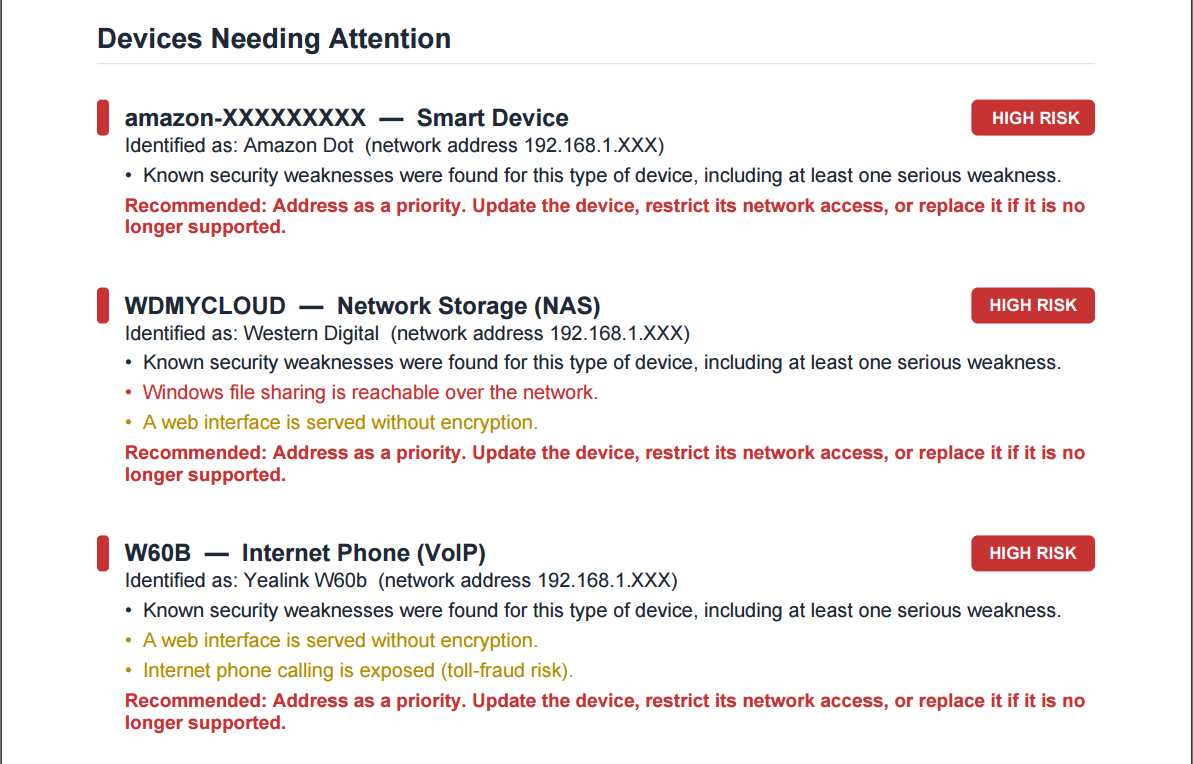

You can use the report during a quarterly business review, attach it to a service ticket or send it to a business owner who does not want to read raw CVE data.
The work was already happening. Now it is visible, defensible and easier to discuss.
One dashboard gives you control back
A genuinely multi-tenant platform does more than place several features beside one another.
It connects them.
The same discovered device can have:
- A live availability status
- Latency and packet-loss history
- Vulnerability findings
- Exposed-service information
- Rogue-device status
- Remote-access options
- Ticket history
- A place in the client report
That is the difference between five tools with integrations and one platform designed around the full workflow.
You spend less time copying information between systems. Your team sees issues earlier. Your clients receive clearer evidence of the work being done.
Most importantly, you can grow your client base without multiplying the operational mess behind it.
Retire the dashboard juggling
If your team is still switching between a monitoring platform, vulnerability scanner, remote-access client, asset spreadsheet and manual reporting process, the problem is not a lack of data.
It is a lack of connection.
Netmon gives you:
- 5+ tools replaced
- 1 agent per site
- 30-second live status refresh
- 100% multi-tenant separation
- Auto-discovery across workstations, servers, printers, cameras and IoT
- Live availability, latency and packet-loss tracking
- Vulnerability and exposure scanning
- Rogue-device detection
- Integrated remote access without a separate licence
- One-click, client-ready PDF reports
See how much complexity you can remove from your current stack.
Book a Netmon demonstration or call the Angstep team on +44 1248 665964.